


When I first started running ads, I thought clicks meant success. They didn’t. I was getting traffic, but I had no idea what was working. No clarity on conversions. No data to optimize.
That’s when I learned the importance of a proper ppc conversion tracking setup guide. Once I implemented tracking correctly, everything changed. I stopped guessing and started making decisions based on real data.
If you want to run profitable campaigns, tracking is not optional. It is the foundation.
Key Takeaways
- Conversion tracking shows what actually drives results
- Without tracking, you cannot optimize campaigns effectively
- Setting up tracking correctly from the start saves money
- Data helps you scale campaigns confidently
- Small insights from tracking lead to big improvements
What Is PPC Conversion Tracking (Simple Explanation)
Conversion tracking tells you what happens after someone clicks your ad.
It answers questions like:
- Did the user fill a form?
- Did they make a purchase?
- Did they call your business?
Without this information, you are just paying for clicks without knowing their value.
With tracking, every click becomes measurable.
Why Conversion Tracking Matters More Than Traffic
This is something I wish I understood earlier.
More traffic does not mean more success.
What matters is:
- Conversions
- Cost per conversion
- Return on investment
Tracking helps you identify which campaigns generate results and which ones waste budget.
If you want to focus on profitability, this is also connected to: track roi from ppc campaigns
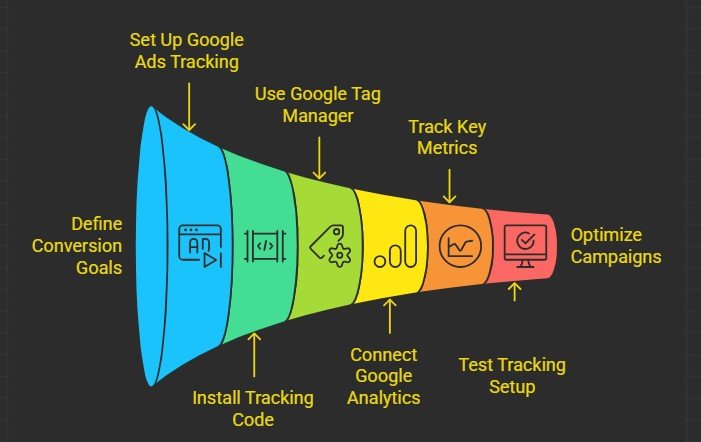
Step 1: Decide What Counts as a Conversion
Before setting up tracking, I define what success looks like.
Common conversions include:
- Form submissions
- Phone calls
- Purchases
- Sign-ups
The key is to track actions that directly impact your business.
If you track everything, you learn nothing. Focus on what matters.
Step 2: Set Up Conversion Tracking in Google Ads
I always start with Google Ads conversion tracking.
The process includes:
- Creating a conversion action
- Choosing the type (website, calls, app, etc.)
- Defining value and settings
Google provides a tracking code that you need to install on your website.
This code records user actions after they click your ad.
Step 3: Install Tracking Code Properly
This step is critical. If your tracking code is not installed correctly, your data will be inaccurate.
I make sure:
- The code is placed on the correct pages
- It fires after the conversion action
- It is tested before launching campaigns
For example, if you track form submissions, the code should trigger after the form is completed.
Step 4: Use Google Tag Manager for Better Control
When I started using Google Tag Manager, managing tracking became much easier.
It allows you to:
- Add and update tracking codes without editing website code
- Manage multiple tags in one place
- Test tracking before going live
For beginners, this simplifies the entire process and reduces errors.
Step 5: Connect Google Analytics for Deeper Insights
Google Ads shows conversion data, but Analytics gives you deeper insights.
I connect both to understand:
- User behavior
- Traffic sources
- Conversion paths
This helps me identify where users drop off and what needs improvement.
Step 6: Track the Right Metrics
Tracking everything is not useful.
I focus on key metrics:
- Conversion rate
- Cost per conversion
- Click-through rate
These metrics tell me whether my campaign is performing well.
If the conversion rate is low, I fix the landing page.If CPC is high, I optimize keywords.
Step 7: Test Your Tracking Setup
Before running campaigns, I always test everything.
- Complete test conversions
- Check if data is recorded
- Verify accuracy
This step prevents costly mistakes later.
Step 8: Use Tracking Data to Optimize Campaigns
This is where tracking becomes powerful.
I use data to:
- Identify high-performing keywords
- Pause low-performing ads
- Adjust bids
- Improve landing pages
Without tracking, these decisions are based on guesswork.
With tracking, they are based on facts.
Common Mistakes in PPC Conversion Tracking
I made these mistakes early on:
- Not setting up tracking before launching campaigns
- Tracking the wrong actions
- Incorrect code placement
- Ignoring tracking data
- Not testing setup
Avoiding these mistakes ensures accurate data and better decisions.
How Long Does It Take to See Useful Data?
From my experience:
- First few days: basic data collection
- 1–2 weeks: initial insights
- 1 month: reliable patterns
The more data you collect, the better your optimization decisions become.
How Conversion Tracking Connects to Campaign Success
Tracking is not just a technical step.
It is what turns campaigns into systems.
Once I started tracking properly, I could:
- Scale winning campaigns
- Cut wasted spend
- Improve overall performance
It gave me control over results.
Frequently Asked Questions
1. What is the most important conversion to track?
The most important conversion is the one that directly impacts your business goals, such as sales or qualified leads. Avoid tracking actions that don’t contribute to revenue.
2. Can I run PPC campaigns without conversion tracking?
Yes, but it is highly risky. Without tracking, you won’t know which campaigns are working, which can lead to wasted budget and poor results.
3. How do I know if my tracking is working correctly?
You should test conversions manually and verify that they are recorded in your dashboard. Regular checks ensure accuracy and reliability.
4. Does conversion tracking improve campaign performance?
Indirectly, yes. It provides the data needed to optimize campaigns, which leads to better performance over time.
A Smarter Way to Measure PPC Success
Following a proper ppc conversion tracking setup guide changed how I approach advertising.
I stopped guessing and started making data-driven decisions.That shift made my campaigns more efficient and profitable.
If you set up tracking correctly, focus on meaningful metrics, and optimize consistently, you won’t just run ads.You’ll build campaigns that deliver measurable results.