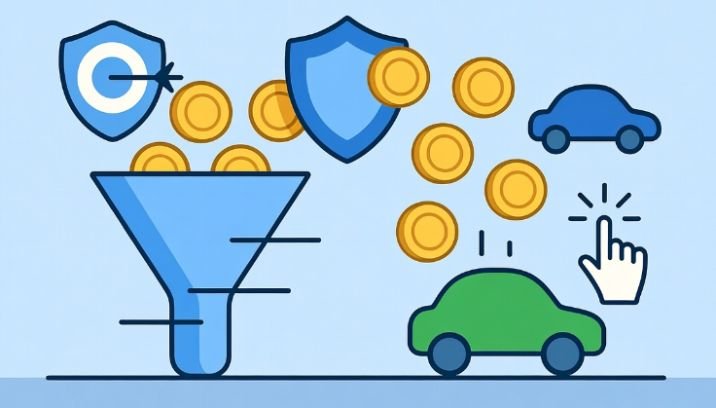


When I first started running ads, I focused on clicks, impressions, and traffic. Everything looked good on the surface. But when I checked the actual results, something didn’t add up.
I was spending money, but I wasn’t sure if I was making any. That’s when I realized the importance of learning how to track roi from ppc campaigns. Once I started measuring real returns instead of vanity metrics, my entire strategy changed.
If you want to run profitable campaigns, you need to track ROI, not just performance.
Key Takeaways
- ROI shows whether your PPC campaigns are actually profitable
- Clicks and traffic do not equal success
- Tracking revenue is more important than tracking clicks
- Data-driven decisions lead to better scaling
- Small improvements in ROI can significantly increase profits
What Does ROI in PPC Actually Mean?
ROI stands for Return on Investment.
In simple terms:
How much money are you making compared to how much you are spending?
The formula I use is: ROI = (Revenue – Ad Spend) ÷ Ad Spend
If your ROI is positive, your campaign is profitable.If it’s negative, you are losing money. Understanding this is critical because it shifts your focus from activity to results.
Why Tracking ROI Matters More Than Anything Else
Most beginners track:
- Clicks
- Impressions
- Traffic
These metrics are useful, but they don’t tell the full story.
ROI tells you:
- Which campaigns generate profit
- Which ads waste money
- Where to scale your budget
Without ROI tracking, you might increase spending on campaigns that are actually losing money.
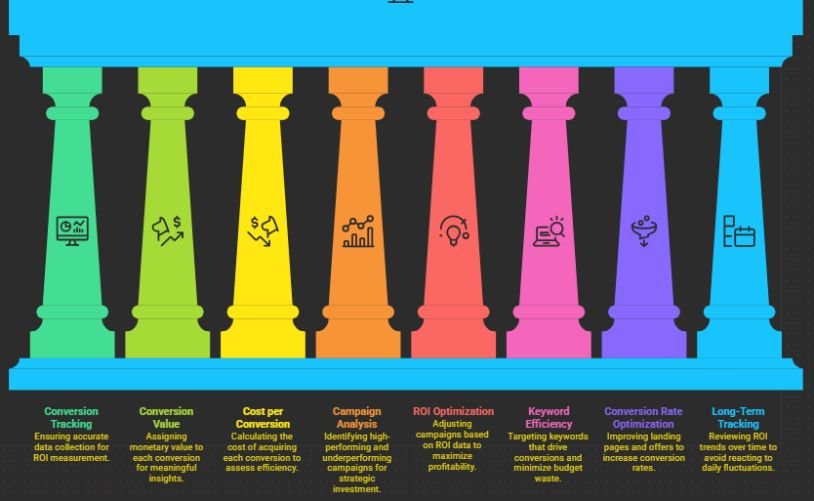
Step 1: Set Up Proper Conversion Tracking
You cannot track ROI without accurate conversion data.
Before doing anything else, I ensure:
- Conversion tracking is active
- All important actions are tracked
- Data is accurate
If you haven’t done this yet, start here: ppc conversion tracking setup guide
This step is the foundation of everything.
Step 2: Assign Value to Every Conversion
Tracking conversions alone is not enough.
You need to assign a value to each action.
For example:
- A sale = exact revenue
- A lead = estimated value based on conversion rate
When I started assigning values, I could finally measure the true impact of my campaigns.
This step turns basic tracking into meaningful insights.
Step 3: Calculate Cost per Conversion
This metric tells you how much you are spending to get results.
I calculate:
Cost per conversion = Total spend ÷ Total conversions
This helps me understand whether my campaigns are efficient. If cost per conversion is too high, I know I need to optimize.
Step 4: Analyze Campaign Performance
Once data is available, I look at performance across campaigns.
I identify:
- High ROI campaigns
- Break-even campaigns
- Loss-making campaigns
This helps me decide where to invest more and where to cut back.
Step 5: Optimize Based on ROI Data
This is where real improvement happens.
I use ROI data to:
- Increase budget for profitable campaigns
- Pause underperforming ads
- Adjust keyword targeting
- Improve landing pages
If your campaigns are expensive, this strategy helps: reduce ppc cost without losing traffic
Lower costs directly improve ROI.
Step 6: Improve Keyword Efficiency
Not all keywords perform equally.
I analyze:
- Which keywords drive conversions
- Which ones waste budget
If you’re unsure how to identify the right keywords, explore: how to find ppc keywords
Better keyword targeting leads to higher ROI.
Step 7: Focus on Conversion Rate Optimization
Improving conversion rate is one of the fastest ways to increase ROI.
I work on:
- Better landing pages
- Clearer offers
- Stronger calls to action
Even a small increase in conversion rate can significantly boost profitability.
Step 8: Track ROI Over Time, Not Daily
One mistake I made early was checking ROI too frequently.
PPC data needs time.
I now:
- Review weekly trends
- Analyze monthly performance
- Avoid reacting to daily fluctuations
This approach gives a more accurate picture of performance.
Common Mistakes When Tracking ROI
I’ve made these mistakes before:
- Not assigning value to conversions
- Focusing only on clicks
- Ignoring long-term customer value
- Making decisions too quickly
- Not tracking all conversion sources
Avoiding these mistakes improves accuracy and decision-making.
How Long Does It Take to See ROI Results?
From my experience:
- First week: initial data
- 2–4 weeks: trend analysis
- 1–2 months: reliable ROI insights
Patience is key. ROI improves with consistent optimization.
What Actually Improves ROI in PPC Campaigns
Here’s what I learned over time:
ROI improves when everything works together:
- Strong keywords
- Relevant ads
- Optimized landing pages
- Accurate tracking
No single change fixes everything.
It’s the combination that drives results.
Frequently Asked Questions
1. What is a good ROI for PPC campaigns?
A good ROI depends on your business, but generally, a positive ROI means your campaigns are profitable. Many businesses aim for at least 2x return on ad spend.
2. Can I track ROI without sales data?
Yes, you can assign estimated values to leads or actions based on your average conversion rates and customer value.
3. Why is my PPC ROI negative?
This usually happens due to poor targeting, high CPC, or low conversion rates. Reviewing keywords and landing pages can help fix this.
4. How often should I check ROI?
It is best to review ROI weekly or monthly rather than daily to get a clearer picture of performance trends.
A Smarter Way to Turn PPC Into a Profit Engine
Learning how to track roi from ppc campaigns completely changed how I measure success.
I stopped chasing clicks and started focusing on profit. That shift made my campaigns more efficient and scalable. If you track the right data, assign value correctly, and optimize consistently, you won’t just run ads.
You’ll build a system that generates real returns.